Receipt printing is an essential part of daily business operations across retail stores, restaurants, supermarkets, hotels, and service centers. Customers expect clear proof of payment immediately after completing a transaction, while employees need printing equipment that can keep pace with busy checkout environments. Slow printing, unclear text, or frequent paper-feed problems can interrupt service and create unnecessary delays.
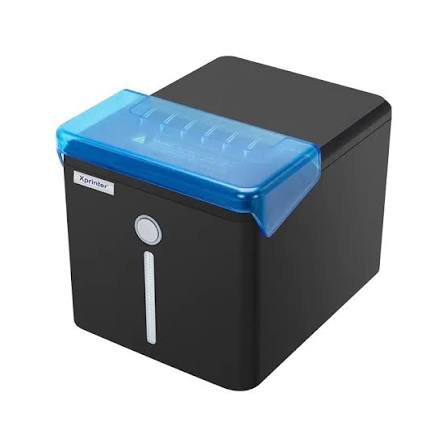
Thermal printing technology offers an efficient way to produce receipts without relying on traditional ink cartridges or toner. Businesses can use an Xprinter Thermal Printer to support transaction documentation and other point-of-sale activities, provided the selected model matches their operational requirements. Understanding the features behind this technology helps businesses make informed decisions about receipt printing equipment.
1. Understanding How Thermal Receipt Printing Works
Thermal receipt printers use heat to create text and images on specially coated paper. Unlike conventional inkjet printers, direct thermal models do not spray liquid ink onto a surface. Instead, a heated printhead activates the coating on thermal paper to produce the required content.
The printing process generally follows these steps:
- A POS system generates transaction information.
- The information is sent to the connected printer.
- The printer processes the data and controls its printhead.
- Heat activates specific areas of the thermal paper.
- The completed receipt exits through the paper outlet.
Because this process involves fewer consumable components, direct thermal printers can be convenient for businesses that produce large numbers of receipts.
2. Faster Printing for Busy Checkout Counters
Printing speed is important when multiple customers are waiting to complete purchases. A printer that takes too long to generate each receipt can contribute to checkout delays, particularly during lunch breaks, weekends, promotional events, and seasonal shopping periods.
Thermal printers are designed to produce text quickly, making them suitable for many high-volume transaction environments.
Fast receipt production can help businesses:
- Keep checkout lines moving.
- Reduce waiting time between transactions.
- Support employees during busy periods.
- Process more customer orders efficiently.
- Maintain a smoother payment experience.
Actual performance depends on the printer’s rated speed, print density, receipt length, and the processing capabilities of the connected POS system.
3. Consistent Print Quality and Readable Information
Receipt readability is just as important as printing speed. Customers and employees must be able to identify product descriptions, prices, taxes, payment information, and transaction references.
Thermal printers can produce clear text when businesses use compatible paper and maintain the printhead properly.
Several factors influence output quality:
Print resolution: Determines how precisely the printer reproduces small text, symbols, and graphics.
Paper quality: Compatible thermal paper helps produce consistent results and reduces the likelihood of printing defects.
Printhead condition: Dust and residue can create faded areas or uneven lines.
Printing settings: Appropriate darkness and speed settings help balance readability with performance.
Businesses should test sample receipts before deploying equipment across multiple checkout stations.
4. Reducing Interruptions from Ink and Toner Replacement
Traditional inkjet and laser printers require ink cartridges or toner supplies. Managing these consumables can create additional work for businesses that print frequently.
Direct thermal receipt printers eliminate the need for ink and toner because the printhead creates images through heat. Employees primarily need to replace the thermal paper roll when it runs out.
This simpler supply process can reduce interruptions caused by cartridge replacement and make routine printing easier to manage.
However, businesses should remember that thermal paper is still a recurring expense. Paper rolls must be stored properly, and compatible materials should be selected to maintain consistent print quality.
5. Supporting Reliable POS System Integration
Receipt printers generally operate as part of a larger point-of-sale system. The POS software manages transaction details, while the printer converts the information into a physical receipt.
Reliable communication between these components is essential.
Before purchasing a printer, businesses should check:
- Supported operating systems.
- Available printer drivers.
- POS software compatibility.
- Supported command languages.
- Connection interfaces.
- Receipt formatting capabilities.
USB, Ethernet, Bluetooth, and serial interfaces are available on different printer models. Not every device supports all connection types, so businesses should verify the specifications before installation.
6. Maintaining Stable Paper Feeding
A receipt printer must feed paper smoothly to avoid incomplete receipts and operational interruptions. Paper jams, incorrect roll placement, and unsuitable paper dimensions can affect performance.
Many thermal receipt printers use straightforward loading mechanisms that allow employees to replace paper without complicated procedures.
To maintain reliable feeding, businesses should:
- Use paper rolls that match the printer’s specifications.
- Position the roll in the correct direction.
- Avoid forcing oversized rolls into the compartment.
- Keep the paper compartment free from dust and debris.
- Inspect the cutter and feed mechanism regularly.
- Follow the manufacturer’s instructions when clearing jams.
Proper paper handling can prevent avoidable interruptions and extend the useful life of printing components.
7. Automatic Cutting for Efficient Transaction Handling
Some receipt printers include an automatic cutter that separates completed receipts from the remaining paper roll. This feature can be especially useful in stores and restaurants where employees process many transactions throughout the day.
An automatic cutter can help:
- Produce consistently separated receipts.
- Reduce manual tearing.
- Improve checkout convenience.
- Support faster transaction handling.
- Create a more organized counter environment.
Businesses should consider cutter durability and maintenance requirements when comparing models. The feature may not be necessary for every low-volume application.
8. Compact Equipment for Different Business Environments
Space is often limited at checkout counters, restaurant service stations, and reception desks. A large printer can make these areas difficult to organize, especially when employees also need space for payment terminals, monitors, cash drawers, and other equipment.
Compact thermal receipt printers can fit into many commercial workspaces while providing essential printing functions.
Their smaller footprint may be useful for:
- Convenience stores.
- Small retail shops.
- Cafés and coffee shops.
- Restaurant counters.
- Hotel reception areas.
- Mobile service stations, when a suitable portable model is selected.
Before installation, businesses should consider the printer’s dimensions, paper compartment access, cable placement, and ventilation requirements.
9. Supporting Different Receipt Printing Applications
Receipt printing requirements vary depending on the type of business. A supermarket may need detailed receipts with many product lines, while a café may print shorter documents containing order totals and payment information.
Thermal printers can support a range of applications when the model offers the necessary media width, speed, and connectivity.
Common uses include:
Retail transactions: Printing itemized purchase records, discounts, taxes, and payment details.
Restaurant billing: Producing customer bills and transaction summaries.
Hotel services: Printing receipts for accommodation-related payments, restaurants, and other facilities.
Service businesses: Generating payment confirmations and records for completed services.
Ticketing operations: Producing suitable tickets or transaction documents on compatible media.
Selecting a model according to the intended application helps prevent limitations in receipt size and formatting.
10. Managing Operating Costs Over Time
The purchase price is only one part of the total cost of owning a receipt printer. Businesses should also consider paper consumption, maintenance, replacement components, and expected printing volume.
Direct thermal printers can reduce certain operating expenses by eliminating ink and toner purchases. Their relatively simple printing process may also make routine maintenance more manageable.
Nevertheless, total ownership costs vary according to:
- Daily printing volume.
- Thermal paper prices and availability.
- Printhead and cutter durability.
- Maintenance requirements.
- Warranty and technical support.
- Equipment replacement frequency.
A cost comparison based on expected usage provides a more realistic view than comparing initial prices alone.
11. Preventive Maintenance for Reliable Performance
Regular maintenance helps preserve receipt quality and reduces the likelihood of unexpected printing problems. Even dependable equipment can experience issues when paper dust, adhesive residue, or other debris accumulates around internal components.
A practical maintenance routine should include:
- Cleaning the printhead according to manufacturer guidance.
- Checking the platen roller for dirt or damage.
- Inspecting the automatic cutter, if included.
- Removing paper fragments from the compartment.
- Checking power and communication cables.
- Installing compatible paper rolls.
- Updating drivers when required.
Employees should know how to recognize common problems, including faded printing, incomplete receipts, paper-feed errors, and connection failures.
12. Troubleshooting Common Receipt Printing Problems
Understanding basic troubleshooting procedures can help employees resolve minor issues without unnecessarily interrupting business operations.
| Common problem | Possible cause | Practical response |
|---|---|---|
| Blank receipts | Paper loaded incorrectly | Check the thermal side and roll direction |
| Faded text | Dirty printhead or unsuitable paper | Clean the printhead and use compatible paper |
| Paper jams | Incorrect roll size or feeding issue | Reinstall the paper and inspect the feed path |
| Missing characters | Driver or communication issue | Check settings and connection |
| Printer not responding | Power or interface problem | Inspect the power supply and cable connection |
| Uneven printing | Printhead contamination or wear | Clean and inspect the printing mechanism |
If a problem continues after basic checks, employees should follow the manufacturer’s troubleshooting documentation or contact qualified technical support.
13. Choosing the Right Thermal Receipt Printer
The best receipt printer depends on the business’s transaction volume, workspace, software, and printing requirements.
Before selecting equipment, consider the following factors:
Printing Speed and Daily Workload
Estimate how many receipts the business produces during normal and peak operating hours. Higher-volume locations may benefit from models designed for frequent printing.
Paper Width and Receipt Format
Check whether the printer supports the required paper width and receipt length. Businesses that include detailed product descriptions or promotional information may need more printing space.
Connectivity Options
Choose an interface that works with existing POS terminals, computers, tablets, or network infrastructure.
Print Resolution
Review resolution specifications if receipts contain small text, logos, or detailed graphics.
Durability and Support
Consider the expected operating environment, maintenance requirements, warranty coverage, and availability of replacement parts.
Evaluating these factors helps businesses choose equipment that supports their workflow rather than paying for features they do not need.
Conclusion
Fast and reliable receipt printing contributes to smoother transactions, better customer service, and more organized business operations. Thermal printers support these goals through rapid heat-based printing, reduced dependence on ink and toner, and convenient integration with compatible POS systems.
However, dependable performance also requires suitable paper, correct installation, software compatibility, and regular maintenance. By evaluating printing speed, connectivity, media requirements, and long-term operating costs, businesses can select thermal receipt printing equipment that meets their daily needs and supports consistent service.