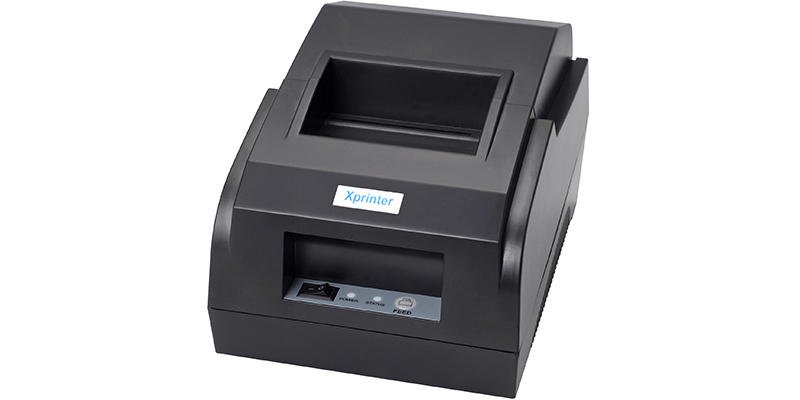
Retail stores, restaurants, cafés, and other hospitality businesses often need to produce receipts and bills quickly while working with limited counter space. A compact printer can support daily transactions without requiring a large workstation or complicated setup.
Choosing the right Mini Bill Printer requires consideration of more than physical size. Businesses should evaluate printing technology, paper requirements, connectivity, speed, compatibility, battery performance, and durability based on how the printer will actually be used.
Identify Your Printing Needs
Start by determining what the printer will produce. Retail businesses may primarily need customer receipts, while restaurants and cafés may require bills, transaction records, or other documents.
Consider the average number of transactions per day, peak operating periods, document length, and whether printing will happen at a fixed counter or in multiple locations.
Choose the Right Printing Technology
Many compact receipt printers use direct thermal technology. This method uses heat-sensitive paper to produce text and graphics without conventional ink or toner.
Thermal printing can simplify consumable management, but businesses still need to use compatible paper and store it properly. Check the manufacturer’s paper specifications before purchasing supplies.
Consider Print Speed
Print speed can affect the pace of customer transactions. A printer that produces receipts quickly can help employees keep up during busy periods.
However, speed should not be considered separately from reliability and print quality. A printer should consistently produce readable documents without frequent paper-feeding or connection problems.
Check Print Quality
Receipts and bills need to be clear and easy to read. Important information such as prices, totals, transaction numbers, and other details should remain distinct.
If the business needs to print barcodes, logos, or graphics, check whether the printer’s resolution and supported formats meet those requirements.
Evaluate Connectivity
Compact printers may support Bluetooth, Wi-Fi, USB, or a combination of these options. Bluetooth can be convenient for mobile POS devices, while Wi-Fi may suit businesses where several devices communicate through a network.
USB can provide a stable wired connection for a printer that remains at a fixed workstation. The best option depends on the business’s equipment and workflow.
Confirm POS Compatibility
A printer should work with the POS software and devices already used by the business. Compatibility can include the operating system, mobile applications, drivers, and communication protocols.
Checking these requirements before purchase can help prevent integration problems and avoid unnecessary changes to the existing checkout system.
Select the Correct Paper Size
Different printers support different paper widths and roll dimensions. Retailers and hospitality businesses should select a model that supports the receipt format they need.
Before ordering paper, check specifications such as:
- Paper width
- Maximum roll diameter
- Core size
- Paper thickness
- Supported thermal paper type
Keeping compatible paper readily available can also help prevent interruptions during busy periods.
Consider Battery Requirements
Battery life matters most when the printer will be used away from a fixed power source. Mobile restaurant service, outdoor events, food trucks, and temporary retail locations may benefit from battery-powered equipment.
For fixed counters, a direct power connection may be more practical. Buyers should select the power configuration according to the actual operating environment.
Look for Durable Construction
Retail and hospitality equipment can experience frequent handling and demanding working conditions. A durable printer may be better suited to environments where equipment is moved often or exposed to dust, moisture, and occasional impacts.
The level of protection required depends on the location and intensity of use.
Make Paper Replacement Easy
Employees should be able to replace paper quickly, particularly during busy service periods. A straightforward paper-loading mechanism can reduce downtime and simplify daily operation.
Clear status indicators can also help staff identify conditions such as paper-out or other basic operating issues.
Consider Maintenance Requirements
Compact thermal printers generally require limited routine maintenance, but regular cleaning can help maintain print quality and paper feeding.
Businesses should consider whether recommended cleaning procedures are simple to perform and whether replacement parts or technical support are readily available.
Compare Total Operating Costs
The purchase price is only one part of the overall cost. Businesses should also consider thermal paper, replacement batteries where applicable, maintenance, accessories, and potential service expenses.
A printer with a slightly higher initial price may provide better value if it offers suitable durability, compatibility, and operating efficiency for the intended workload.
Retail vs. Hospitality Considerations
Retail stores may prioritize compact size, quick receipt printing, POS compatibility, and integration with mobile checkout systems.
Restaurants and cafés may place greater emphasis on fast transaction processing, simple paper replacement, reliable connectivity, and equipment that fits comfortably into busy service areas.
Businesses operating in both environments should prioritize the features that correspond to their actual workflow rather than choosing based on industry labels alone.
Final Buying Checklist
Before purchasing a mini bill printer, review these factors:
- Intended document type and printing volume
- Printing technology and quality
- Print speed
- Connectivity options
- POS and device compatibility
- Paper specifications
- Battery or power requirements
- Durability
- Ease of paper replacement
- Maintenance and long-term operating costs
Conclusion
A mini bill printer can be a practical solution for retail and hospitality businesses that need reliable receipt or bill printing without using significant counter space. The right model should fit the business’s transaction volume, equipment, connectivity needs, and operating environment.
By evaluating print performance, paper compatibility, connectivity, durability, power requirements, and total ownership costs, businesses can choose compact printing equipment that supports efficient everyday operations.