Compact printing systems are often designed to fit inside equipment where space, reliability, and straightforward operation are important. Unlike conventional desktop printers, these systems may need to function as an integrated component within a machine, control panel, kiosk, or automated device.
A Panel Printer Manufacturer generally develops such products by considering mechanical design, printing technology, electronics, connectivity, user interaction, and production requirements together. The development process can vary by application, but a structured approach helps ensure that the finished printer fits both the physical and technical requirements of its intended environment.
Understanding the Application First
The development process usually begins with understanding where and how the printer will be used. A printer intended for a laboratory instrument may have different requirements from one installed in a ticketing machine or industrial controller.
Important factors can include:
- Available installation space
- Required print width
- Expected printing frequency
- Paper type and roll dimensions
- Communication interface
- Power requirements
- Operating environment
- Mounting method
- Required user access
Defining these requirements early helps guide later design decisions.
Designing for Limited Space
Space is one of the defining considerations in compact printer development. Integrated equipment may have very little room for additional hardware, so components need to be arranged efficiently.
Engineers may consider the placement of the print mechanism, paper compartment, circuit board, connectors, sensors, and other components. The design also needs to provide enough access for tasks such as paper replacement and basic maintenance.
A compact footprint should not come at the expense of serviceability or reliable operation.
Selecting the Appropriate Printing Technology
Thermal printing is widely used in compact integrated printers because it does not require ink cartridges or ribbons. However, selecting a printing mechanism involves more than simply choosing a thermal printer.
Developers may evaluate print speed, resolution, paper compatibility, expected duty cycle, power consumption, and available space. The selected mechanism needs to match the requirements of the host equipment.
For applications that primarily produce receipts, records, labels, tickets, or status information, the printing mechanism can be optimized around the expected output.
Developing the Mechanical Structure
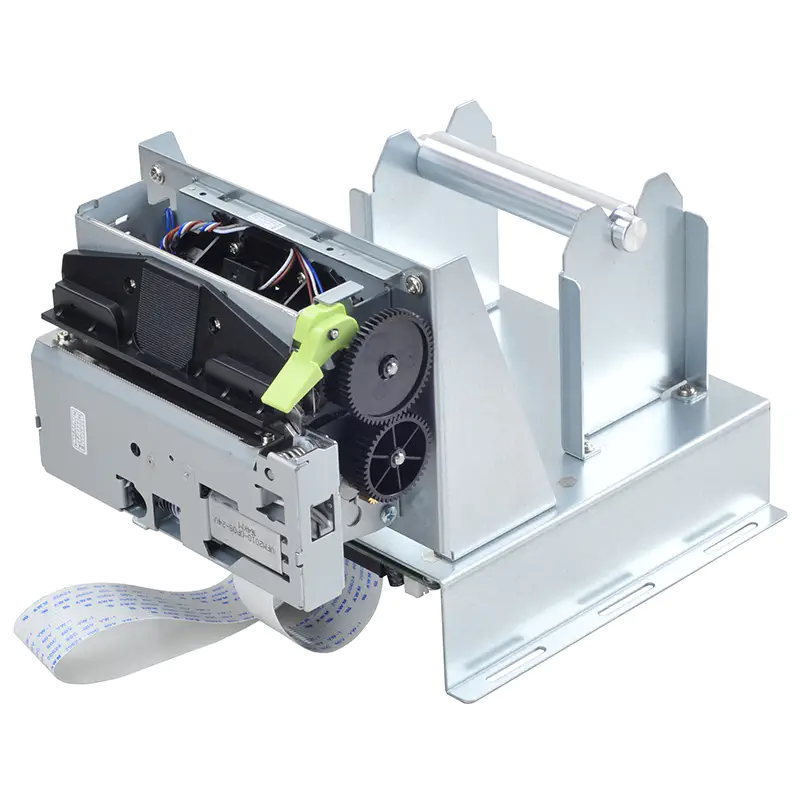
The mechanical structure holds the printing components together and determines how the unit interfaces with the host machine.
Design considerations may include:
- Mounting points
- Housing dimensions
- Paper-roll placement
- Door or cover design
- Roller positioning
- Cutter integration
- Access for maintenance
- Protection of internal components
Mechanical tolerances are particularly important in small printers because minor alignment problems can affect paper feeding or print quality.
Integrating Electronic Components
The electronics provide the connection between the printer mechanism and the larger system. A compact printer may contain a controller board, sensors, motor drivers, interface circuits, and power-management components.
Engineers need to ensure that these components fit within the available space while maintaining appropriate electrical performance.
The design may also need to account for heat generation, electromagnetic considerations, connector placement, and compatibility with the host equipment.
Developing Communication Interfaces
A printer is often controlled by another device rather than operated independently. For this reason, communication compatibility is an important part of development.
Depending on the application, designers may integrate interfaces such as USB, serial communication, Ethernet, or other connection methods.
The printer’s command structure and communication behavior also need to work correctly with the host system. Clear documentation can make integration easier for equipment manufacturers and system developers.
Creating the Paper-Handling System
Paper handling is a central part of a compact printer’s design. The mechanism must move the paper consistently through the printing path without unnecessary complexity.
Developers consider the size and type of paper roll, roller pressure, paper sensors, feed speed, and available space. If the printer includes a cutter, its position and operation must also be coordinated with the paper path.
A well-designed paper path can help reduce jams and simplify routine paper replacement.
Building Prototype Units
Before large-scale production, manufacturers may create prototypes to evaluate the physical and electronic design.
Prototype testing can reveal issues that are difficult to identify during theoretical design work. For example, engineers may discover that a connector is difficult to access, the paper compartment needs more clearance, or the housing requires additional reinforcement.
Prototypes provide an opportunity to make design changes before production tooling and large component orders are finalized.
Testing Core Functions
Functional testing is an important stage of development. A prototype or pre-production unit may be evaluated for several basic functions.
These can include:
- Paper loading and feeding
- Print quality
- Print speed
- Sensor response
- Cutter operation
- Communication
- Power behavior
- Error detection
Testing helps confirm that the individual parts work correctly as a complete system.
Evaluating Durability
Compact printers may be installed in equipment that operates for long periods or performs frequent print cycles. Development teams therefore need to consider durability as well as basic functionality.
Repeated printing and paper-feed tests can help identify wear-related problems. Depending on the intended application, testing may also involve temperature variation, humidity, vibration, or other environmental factors.
The testing requirements should reflect the conditions the printer is expected to encounter in actual use.
Optimizing the User Interface
Even when a printer is integrated into a larger machine, users may still need to interact with it. Common interactions include loading paper, clearing a jam, opening a cover, or checking printer status.
Designers may incorporate buttons, indicator lights, sensors, or other controls to make these tasks straightforward.
Good user-interface design can reduce operator errors and make routine maintenance easier.
Balancing Performance and Power Consumption
Compact equipment often has limited power availability. The printer therefore needs to deliver the required performance without placing unnecessary demands on the host system.
Engineers may evaluate motor operation, heating cycles, standby behavior, and electronic power requirements. Efficient component selection and suitable control methods can help manage overall consumption.
This balance becomes particularly important for battery-powered or energy-sensitive equipment.
Preparing for Manufacturing
A design that works well as a prototype still needs to be practical to manufacture. Before production begins, engineers may review component availability, assembly procedures, tolerances, tooling, and production costs.
Design-for-manufacturing principles can help reduce unnecessary complexity and make assembly more consistent.
At this stage, manufacturers may also establish inspection and testing procedures for production units.
Managing Customization Requirements
Different applications may require modifications to a standard compact printer. These changes could involve mounting dimensions, connectors, firmware behavior, housing design, paper capacity, or user controls.
Customization needs to be considered carefully because even a small change can affect mechanical fit, electronics, testing, and production procedures.
A structured development process helps ensure that modifications remain compatible with the overall system.
Moving From Prototype to Production
Once the design has been validated, the manufacturer can prepare for production. This stage may include finalizing drawings, bills of materials, assembly instructions, testing standards, and packaging requirements.
Production samples may undergo additional inspections before full manufacturing begins. The objective is to confirm that production units maintain the characteristics demonstrated during development.
Quality-control procedures then help maintain consistency across subsequent batches.
Supporting Long-Term Product Reliability
Product development does not necessarily end with the first production run. Manufacturers may monitor field feedback and use service information to identify opportunities for improvement.
Component changes, firmware updates, mechanical revisions, or production-process adjustments may be introduced when necessary. Maintaining documentation and traceability can make these changes easier to manage.
Long-term reliability is particularly important when the printer is integrated into equipment that is expected to remain operational for many years.
Conclusion
Developing a compact printing system involves much more than reducing the size of a conventional printer. Mechanical structure, printing technology, electronics, communication, paper handling, usability, power consumption, testing, and manufacturing all need to work together.
By following a structured development process from application analysis through prototyping, validation, and production, manufacturers can create printing systems that are better suited to the equipment in which they will operate. For businesses selecting an integrated printer, understanding this development process can also make it easier to evaluate whether a particular design is appropriate for the intended application.