A power outage can affect refrigeration, lighting, communication, internet access, and other essential household activities. A reliable backup plan can help keep priority devices operating while utility service is unavailable.
This home emergency generator and outage guide explains how to plan a practical backup system by assessing power needs, selecting suitable equipment, and preparing for different outage conditions.
Start With an Outage Plan
Before choosing a generator, determine what your household actually needs during an outage. Most homes do not need to power every appliance simultaneously.
Start by identifying priority devices such as:
- Refrigerators and freezers
- Wi-Fi routers and modems
- Phones and communication equipment
- Essential lighting
- Fans
- Laptops and computers
- CPAP machines and other compatible medical equipment
Knowing your priorities helps determine the required capacity and output without unnecessarily sizing the system for nonessential loads.
Calculate Your Power Requirements
After identifying essential equipment, check each device’s power requirements. The combined running wattage gives you a starting point for determining the generator’s continuous output requirement.
Also consider startup power. Refrigerators, freezers, pumps, and other motor-driven equipment may temporarily require more electricity when they start than they use during normal operation.
A backup system should have sufficient continuous and peak output for the appliances you intend to connect.
Understand Capacity and Runtime
Battery capacity is measured in watt-hours (Wh). It represents the amount of energy stored in a battery.
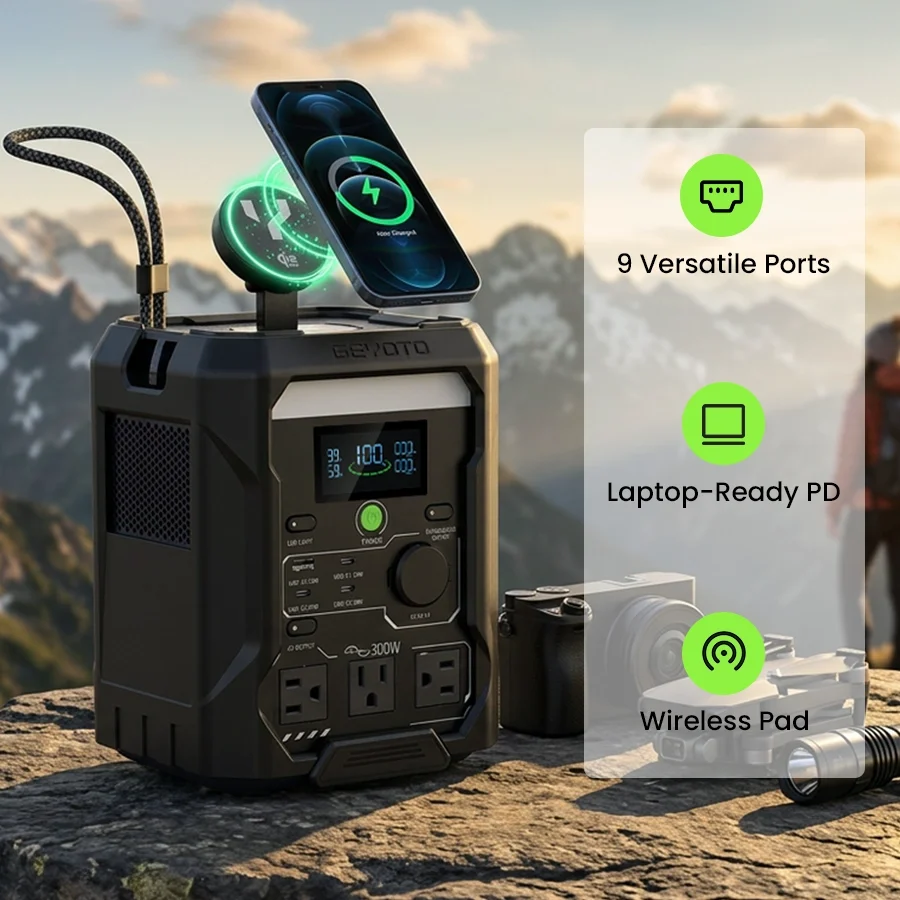
The GEYOTO N300 has a 256Wh capacity and is designed around a compact “Grab and Go” approach. It is suited to camping, travel, small electronics, Wi-Fi routers, laptops, lighting, and short-term outage backup.
The GEYOTO N1000 provides 1,024Wh of capacity and follows an “All-in-One: One Station. Fully Loaded.” positioning. It is designed for higher-capacity home emergency applications, including refrigerators, CPAP machines, fans, Wi-Fi equipment, RV trips, camping, and vehicle-support scenarios.
Actual runtime depends on the power consumption of the connected devices.
Match Continuous and Peak Output
Capacity is only one part of selecting a backup power station. Output determines how much power can be supplied at one time.
The N300 provides 300W continuous pure sine wave output and 500W peak output. It also includes a 550W Constant Power mode for compatible loads within its specified operating conditions.
The N1000 provides 1,800W continuous pure sine wave output, 3,000W peak output, and a 2,400W Constant Power mode.
When planning your backup system, compare these ratings with both the normal and startup requirements of your essential appliances.
Understand Constant Power Mode
Constant Power mode can provide additional flexibility for compatible equipment that requires more power than the standard continuous output.
The N300 supports a 550W Constant Power mode, while the N1000 supports a 2,400W Constant Power mode.
This feature does not increase the battery’s stored energy. Operating a higher-power load can consume available energy more quickly, and the connected equipment must remain within the applicable operating limits.
Consider Battery Chemistry and Cycle Life
The N300 and N1000 both use LiFePO4 batteries and are specified for 4,000 cycles.
Cycle life can be an important consideration for households that expect to use their backup power station repeatedly. Actual service life depends on factors such as temperature, charging practices, storage conditions, operating conditions, and usage.
Follow the manufacturer’s charging and storage recommendations to help maintain the system appropriately.
Plan for Recharge Time
A backup system should be ready for the next interruption. Recharge speed can therefore be important, especially in areas where outages occur frequently.
The N300 can fully recharge in about 1.5 hours.
The N1000 reaches 0–80% in 43 minutes and 100% in 68 minutes.
A fast recharge can reduce the amount of time the system remains unavailable after use and make it easier to prepare for another outage.
Review Ports and Interfaces
A reliable backup plan should account for how your devices connect to the power station.
The N300 provides 9 output outlets and 25W wireless charging.
The N1000 provides 18 total ports and interfaces, including 13 output ports, as well as Qi2.2 25W wireless charging.
Before an outage, identify which devices need AC, USB, DC, wireless, or other connections and make sure you have the appropriate cables available.
Consider UPS Functionality
UPS functionality can help reduce interruptions when utility power fails. This can be particularly useful for compatible Wi-Fi routers, computers, and other electronics.
Both the N300 and N1000 have a specified UPS switching time of less than 10 milliseconds.
UPS performance and compatibility can vary by device, so verify the requirements of sensitive equipment before depending on this function.
Choose a System That Fits Your Lifestyle
Your backup system should also suit how and where you intend to use it.
The N300 is compact and positioned for travel, camping, small electronics, lighting, Wi-Fi equipment, and short-term home backup. Its portability can be useful when the system needs to move between locations.
The N1000 provides greater capacity and output for broader home emergency needs while also supporting camping, RV trips, and compatible vehicle-support applications.
Consider Vehicle-Support Needs
If your backup plan includes vehicle-related uses, check the available outputs carefully.
The N1000 includes an XT60 vehicle-support output rated at 12.6V/30A, with up to 378W of output for compatible vehicle-support applications.
This can make a portable power station useful beyond household emergencies.
Create a Power Priority System
During a short outage, you may be able to operate several devices without difficulty. A longer outage requires more careful energy management.
A simple priority system can help. Refrigeration, communication equipment, essential lighting, and compatible medical devices may receive priority, while nonessential appliances can remain disconnected.
Reducing unnecessary loads can extend the available runtime and preserve energy for the equipment that matters most.
Prepare the Generator Before an Outage
Do not wait until the electricity fails to learn how your backup system works.
Before an emergency:
- Keep the power station adequately charged according to manufacturer recommendations.
- Store essential cables and adapters in an accessible location.
- Check the wattage requirements of priority devices.
- Understand the available ports and output limits.
- Establish which appliances have priority.
- Inspect the equipment for visible damage before use.
A simple preparation routine can make the backup system easier to use during a stressful situation.
Follow Basic Safety Practices
Fuel-powered generators require special safety precautions. Because they produce exhaust gases, they must be operated outdoors in an appropriate, well-ventilated location. Never use an internal-combustion generator inside a home, garage, basement, or other enclosed space because of carbon monoxide risks.
Battery-based portable power stations do not use an internal combustion engine, but they still need proper charging, operation, and storage. Follow the manufacturer’s instructions and do not exceed rated limits.
What to Consider When Comparing Backup Systems
When evaluating a portable power station or generator, focus on the specifications that directly affect your emergency plan:
- Capacity: How much energy is stored?
- Continuous output: Can it support your normal appliance loads?
- Peak output: Can it handle startup requirements?
- Constant Power: Does it support compatible higher-power loads?
- Battery type: Is the battery chemistry suitable for your expected use?
- Cycle life: Is the system designed for repeated charging?
- Recharge time: How quickly can it be ready again?
- Ports: Are there enough suitable connections?
- UPS: Can it minimize interruptions for compatible electronics?
- Portability: Can you store and move it conveniently?
Final Thoughts
Reliable emergency backup begins with planning rather than simply purchasing the largest generator available. Identify the devices you need most, calculate their power requirements, and choose a system with appropriate capacity and output.
The GEYOTO N300 provides 256Wh of compact, portable backup power, while the N1000 offers 1,024Wh with substantially higher output and a broader range of interfaces. By comparing capacity, output, recharge speed, battery life, ports, UPS functionality, and intended uses, you can create a backup power plan that is better matched to your household’s needs.